Restaurant POS that runs the counter, the kitchen and the food cost.
In short Take orders at the counter or from a waiter's tablet, send them to a kitchen screen and printer, and see what every plate really costs. Shifts, voids and discounts stay under control, and every sale posts to your inventory and accounts automatically.
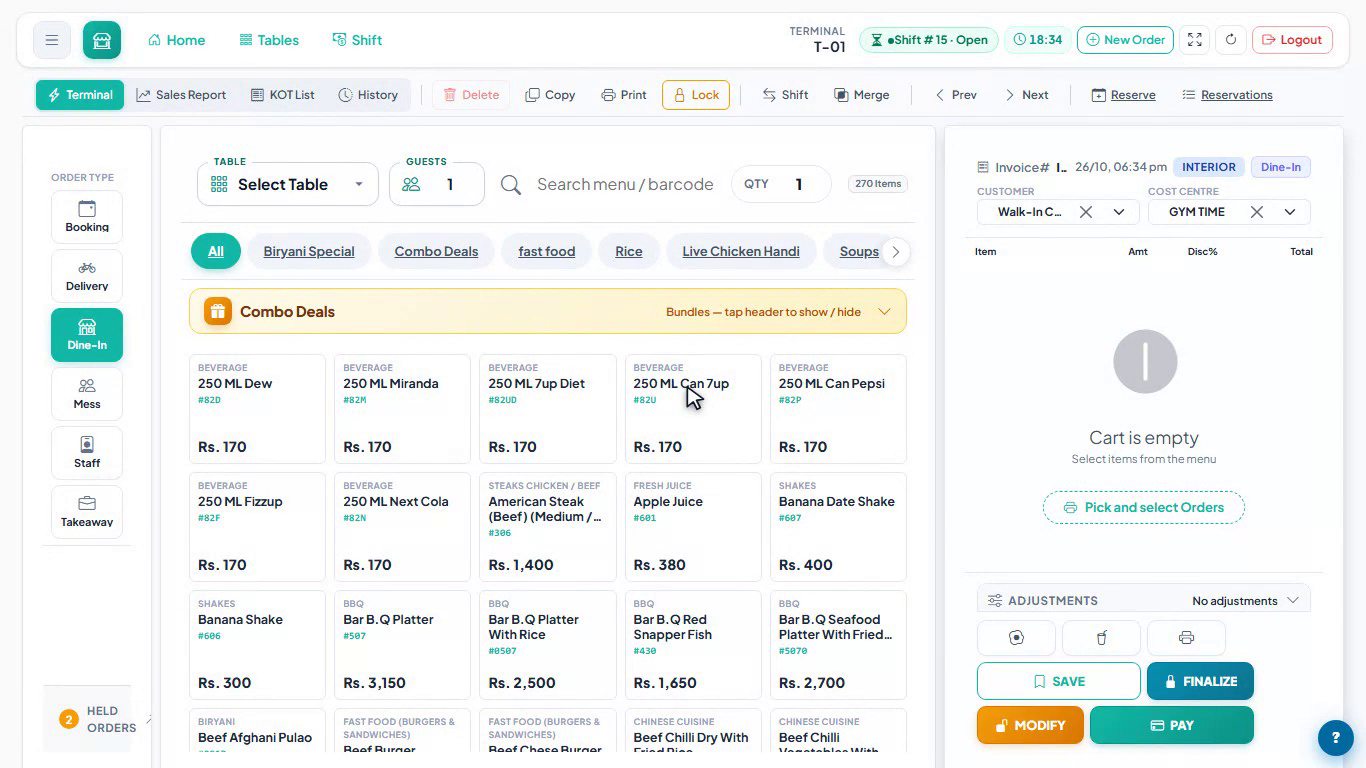
POS terminal.
The touch-first terminal: order type on the left, a searchable menu with barcode lookup and combo deals in the middle, and the bill on the right with customer, cost centre, adjustments, Save, Finalize, Modify and Pay.
The everyday leaks,
closed.
The problems restaurant owners tell us about most, and the part of the POS that handles each one.
Orders lost between counter and kitchen
A kitchen display with New, Preparing and Ready columns, stations and colour-coded ticket age, plus kitchen slips on 80 mm thermal printers.
Not knowing what a plate costs
A recipe on every menu item, priced from the latest purchase rate, with live food-cost %, margin and a what-if price before you change the menu.
Stock that disappears
A waste report compares what your recipes say the kitchen should use with what it drew from the store, and flags anything above your target.
Cash short at closing
Every shift opens with a float and closes with a counted total, and the shift journal posts to your accounts by itself.
Voids and discounts nobody approved
Voids, re-opens and discounts above the limit need a manager's approval, print a Correction slip and stay in the POS audit log.
Slow table service
Waiters send orders from a tablet; when an order grows, only the new items print. Tables can be transferred, merged and reserved.
From the table
to the ledger.
Real screens from the current release, shown on demo data. Click any screen to zoom in.

Kitchen Display System.
Kitchen order tickets arrive in New with their item notes, move through Preparing and Ready, and change colour as they age. The kitchen can filter by station, recall a ticket and see a running total of every item on order.

Combo deals and bundles.
A combo is one line on the bill, while the kitchen slip lists every item inside it. Each combo is assigned to the hall, the takeaway window or both, and the Product Mix report counts the items inside combos too.

Recipe and real-time cost.
Every menu item can carry a recipe (bill of materials). Ingredient rates come from the latest purchase price, and packaging, overhead and a target food-cost percentage are set per item, so plate cost and margin are always current. The signed-in user's name is redacted.
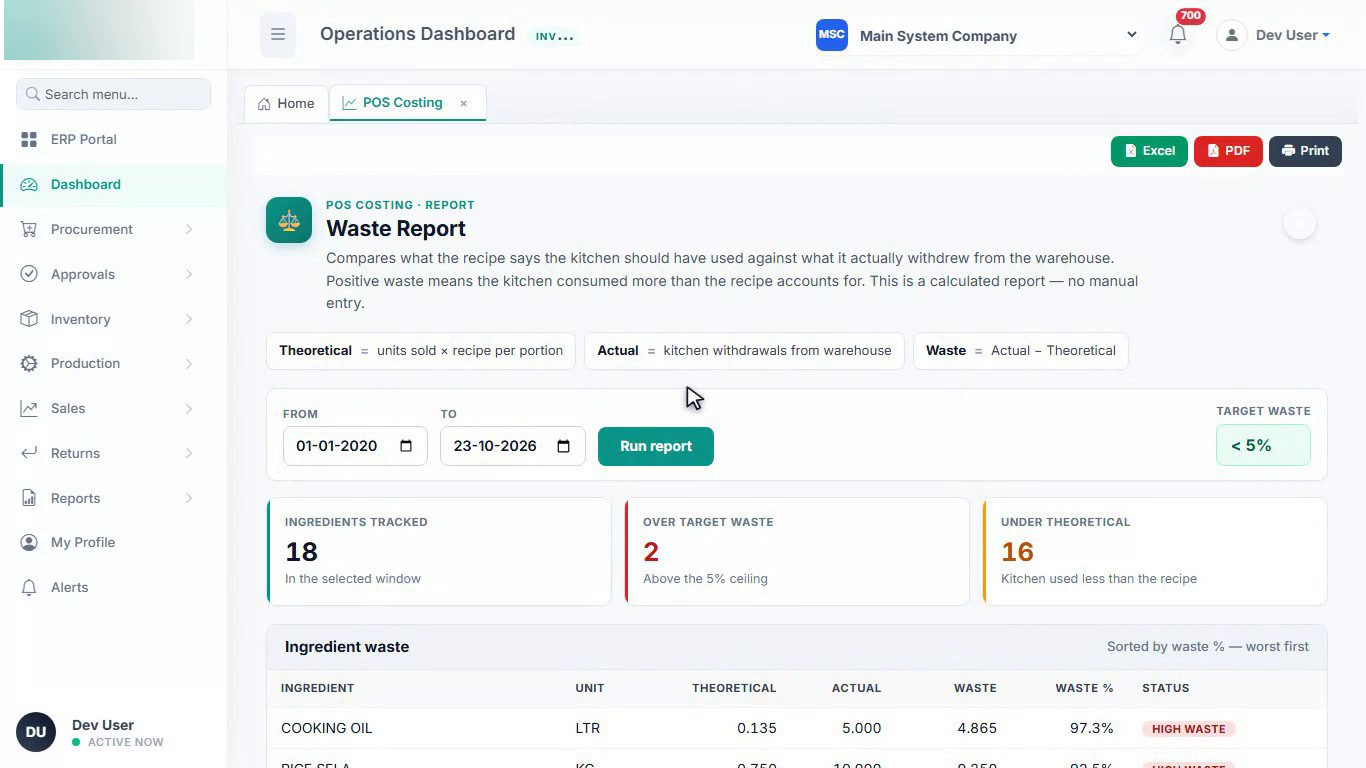
Kitchen waste report.
What the recipes say the kitchen should have used, against what it actually drew from the store. Ingredients above the target waste ceiling are flagged worst first, and the report exports to Excel or PDF.

POS Operations Dashboard.
Revenue trends, hourly demand, top items, payment mix and cashier performance for any date range, next to Cashier Performance, Kitchen Performance, Product Mix and the Z-Report. The signed-in user's name is redacted.
Your stock, accounts and staff
in the same system.
The POS is one workspace of our multi-company ERP. Add the others when you need them.
Inventory & purchasing
Requisition to supplier bill, store issues, transfers and returns, with low-stock and expiry alerts.
Finance & accounting
Double-entry vouchers, receivables, payables, bank reconciliation and 85 report screens with Excel and PDF export.
HR & payroll
Attendance, leave, advances, payslips and payroll journals, driven by the rules your HR manager sets.
Catering & events
Banquet and outdoor catering bookings from quote to final payment, with vouchers that post themselves.
Three steps
to your first order.
Free 30-minute call
Tell us about your counters, menu, order types and printers. We show you the POS on demo data and answer your questions.
Set up on your menu
We send a written scope and quote. Once agreed, we load your menu, recipes, tables and printers and match the order types you use.
Train and go live
We train your cashiers, waiters and kitchen staff, and 30 days of support are included after launch.
Restaurant POS,
answered.
What does the DeviSofts restaurant POS do?
Can waiters take orders on a tablet?
Does it work with a kitchen display and thermal printers?
How does it calculate food cost?
How are cash, voids and discounts controlled?
Can one installation run several outlets or companies?
How much does it cost?
Ready for a calmer
rush hour?
Book a free 30-minute demo. Tell us how your restaurant works and we will show you the POS on the same kind of orders.