Enterprise ERP & POS: nine business workspaces, one ledger.
In short A web-based, multi-company ERP built by DeviSofts. One sign-in opens nine workspaces (a restaurant POS with kitchen display, inventory and purchasing, finance and accounting, donations, student fees, HR and payroll, a fitness club, catering and an admin control center) and every sale, receipt, bill and salary posts to the same double-entry ledger. It runs a multi-company organisation's daily operations, and 2026 added three new workspaces, recipe costing, an admin copilot and much more.

ERP Portal: choose your workspace.
After sign-in, each person sees only the workspaces their role allows. An administrator sees them all: inventory, restaurant POS, catering, donations, finance, student fees, HR and payroll, and the fitness club, each with its own focused set of tools.
- Product
- Enterprise ERP & POS, version 2.0
- Built for
- Organisations that run several operations under one roof (a restaurant, stores, a charity, a school and a gym) across more than one company
- Workspaces
- Restaurant POS · Inventory · Finance & Accounting · Donations · Student Fees · HR & Payroll · Fitness Club · Catering & Events · Admin Control Center
- Scale
- 380+ screens · 207 database tables · 85 report screens with Excel and PDF export
- Companies
- Multi-company with isolated data; five companies in live use on one installation
- Platform
- C# on ASP.NET WebForms (.NET Framework 4.7.2), Microsoft SQL Server, IIS on Windows Server
- Hardware
- Touch terminals, waiter tablets, kitchen screens and 80 mm thermal printers over the local network
- Dates & language
- dd/MM/yyyy on every screen and print, Hijri dates alongside Gregorian, Urdu navigation labels
- Quality evidence
- About 1,100 automated end-to-end tests in 154 Playwright spec files
- Training
- 20 Urdu-narrated video guides covering every workspace, recorded on the current release
Three new workspaces,
and a sharper POS.
Shipped between August and November 2026, and shown on screen in the latest training guides.
Three new workspaces
Student Fee & Receivables, HR & Payroll, and Fitness & Wellness Club: each with its own dashboard, reports and journals posted to finance.
Recipe costing
A recipe on every menu item, priced from the latest purchase rate, with live food-cost %, margin and what-if pricing with projected monthly profit.
Kitchen waste control
A waste report compares what recipes say the kitchen should use with what it drew from the store, and flags anything above the target.
Combo deals
Bundles sold as one line on the bill, with every item inside printed on the kitchen slip and counted in Product Mix.
Performance dashboards
POS operations, cashier and kitchen performance, per-order profitability and a CEO loss view, for any date range.
Admin & Software Copilots
Plain-language questions answered from the company's own data with read-only queries, plus how-to answers that link to the right page.
Configuration Dashboard
Green, amber or red for every set-up area of every module, with a pencil that opens the page to fix it.
Approvals with a reason
Vouchers above a limit, supplier payments, scholarships, part fee payments, POS voids and high discounts wait for an approver, with the reason kept.
Spreadsheet imports
Students, staff, donors, items, fixed assets and opening balances load from a sheet, with a preview or check before anything is saved.
From the table
to the ledger.
Built for a busy restaurant with a dine-in hall and a takeaway window, each with its own counter, cashiers and printers. Restaurant POS overview
- Six order types: dine-in, takeaway, delivery, booking, mess and staff meals, and managers can add more, such as drive-thru.
- Waiter tablets send table orders straight to the kitchen; when an order grows, only the new items print.
- Kitchen display with stations, colour-coded ticket age, recall and KOT history, plus LAN thermal printing of kitchen and counter slips.
- Floor plan with transfer, merge and reservations; held orders, screen lock and keyboard shortcuts for fast counters.
- Shifts with an opening float, a counted close and a shift journal that posts to finance by itself.
- Manager approval for voids, re-opens and discounts above the limit; every correction prints a Correction slip and lands in the POS audit log.
- Credit customers with their own receivable account, credit limit and default discount, plus named discount profiles.
- Costing: recipes, a waste report and profitability per order, with each sale keeping its own cost.
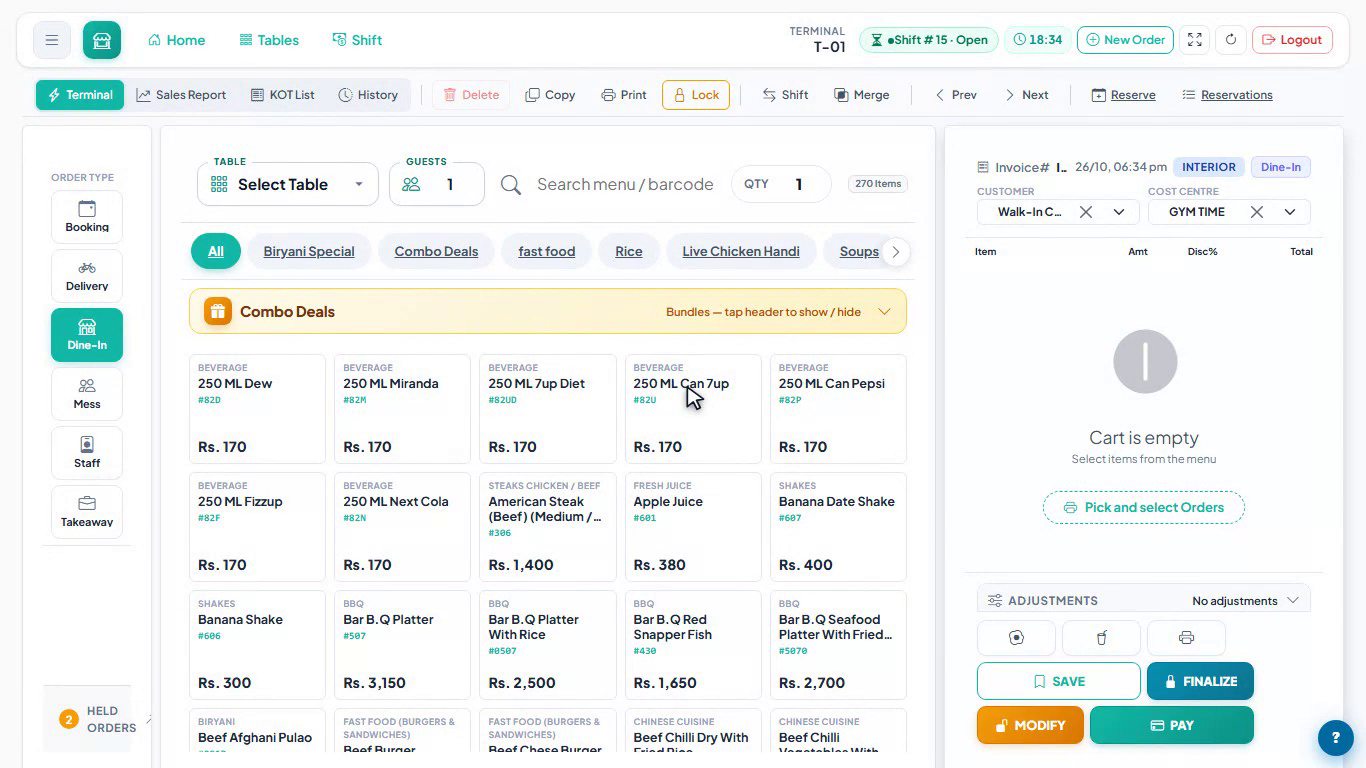
POS terminal.
The touch-first terminal: order type on the left, a searchable menu with barcode lookup and combo deals in the middle, and the bill on the right with customer, cost centre, adjustments, Save, Finalize, Modify and Pay.

Kitchen Display System.
Kitchen order tickets arrive in New with their item notes, move through Preparing and Ready, and change colour as they age. The kitchen can filter by station, recall a ticket and see a running total of every item on order.

Combo deals and bundles.
A combo is one line on the bill, while the kitchen slip lists every item inside it. Each combo is assigned to the hall, the takeaway window or both, and the Product Mix report counts the items inside combos too.
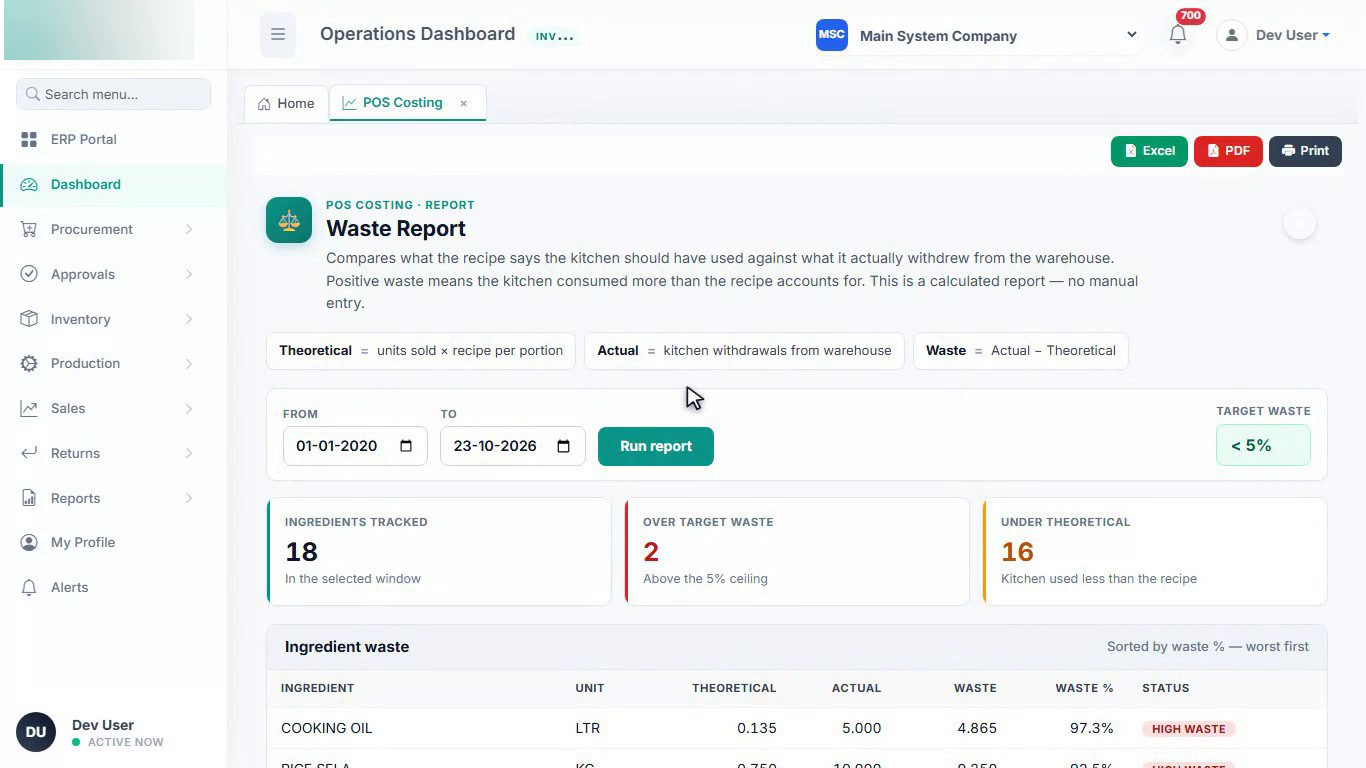
Kitchen waste report.
What the recipes say the kitchen should have used, against what it actually drew from the store. Ingredients above the target waste ceiling are flagged worst first, and the report exports to Excel or PDF.

Recipe and real-time cost.
Every menu item can carry a recipe (bill of materials). Ingredient rates come from the latest purchase price, and packaging, overhead and a target food-cost percentage are set per item, so plate cost and margin are always current. The signed-in user's name is redacted.

POS Operations Dashboard.
Revenue trends, hourly demand, top items, payment mix and cashier performance for any date range, next to Cashier Performance, Kitchen Performance, Product Mix and the Z-Report. The signed-in user's name is redacted.
Every stock movement,
on one ledger.
Stores, kitchens and departments share one stock ledger, so on-hand quantities always match the documents behind them.
- Purchase to pay: requisition, approval, purchase order, goods received and supplier bill, or a one-screen direct purchase from the market.
- Internal requisitions and stock issues to the kitchen, consumption, returns and two-step transfers between warehouses.
- Append-only stock ledger: a void reverses stock instead of deleting it, and a bill cannot be lowered below what is already paid.
- Physical stock checks, low-stock and expiry alerts, non-moving stock and price history.
- Sales orders, delivery notes, sales invoices and returns; bills of material and work orders.

Operations Dashboard.
The store and purchasing overview by company, month and warehouse: what has been invoiced, paid and is still owed to suppliers, open catering balances, and inventory health with low-stock, expiry and approval alerts.
Double entry,
end to end.
Every other workspace posts here, so the trial balance drills down to the sale, receipt, bill or payslip that made each entry.
- Vouchers: journal, cash and bank payments and receipts, with debit and credit balance enforced, F1 account search and approval above set limits.
- Multi-company chart of accounts with shared and company-specific accounts, fiscal years and opening balances from a sheet.
- Receivables and payables with supplier advances, debit notes, batch payment runs, write-offs and ageing.
- Cheques tracked from pending to cleared or bounced, bank reconciliation and a day-end cash position.
- Rental income, fixed assets with depreciation and disposal, budgets with variance, currencies and withholding tax.
- 85 report screens: trial balance, income statement, balance sheet, cash flow and ledgers, with Excel and PDF export.

Finance Hub.
Every finance page in one place, in ten sections: general ledger and vouchers, receivables, payables, cash and bank, daily operations, rental income, student fees, fixed assets, budgets and tax, and statements and period close.
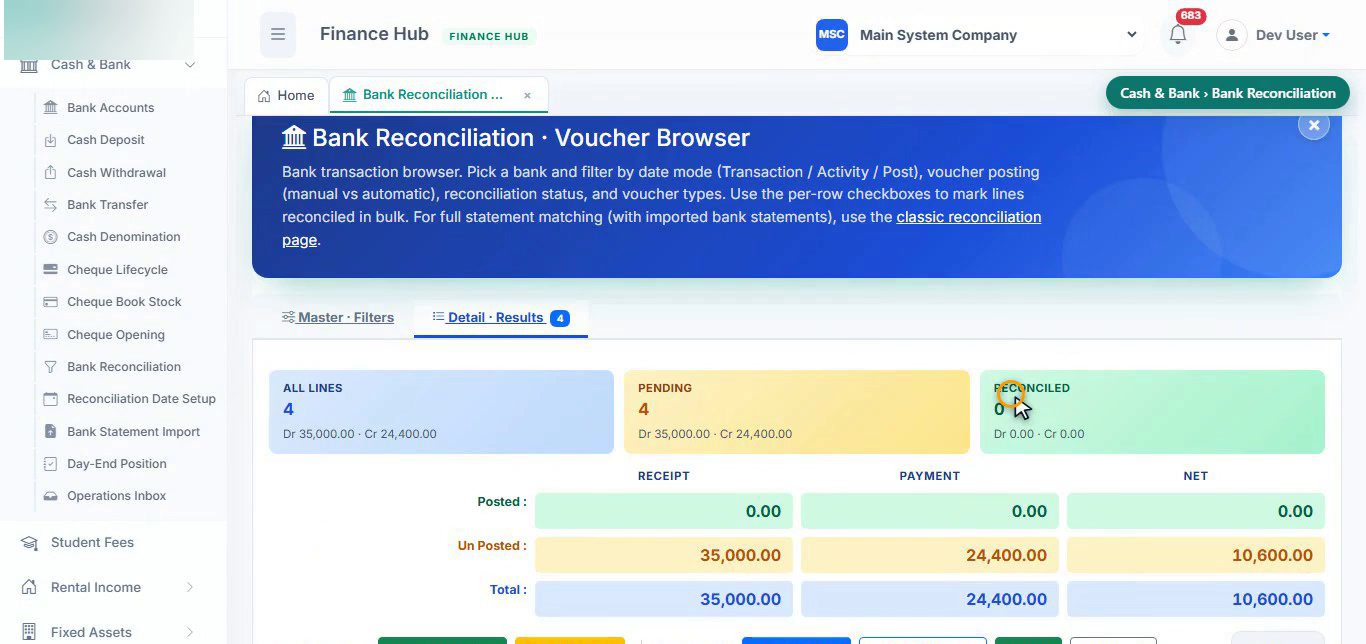
Bank reconciliation.
Pick a bank account and a date mode, then tick lines to mark them reconciled in bulk. Imported bank statements can be matched line by line, and the reconciliation statement walks from the book balance to the bank balance.
Fund-wise giving,
fully accounted.
Every rupee is received against a fund, every receipt posts its own voucher, and donated goods go straight into stock.
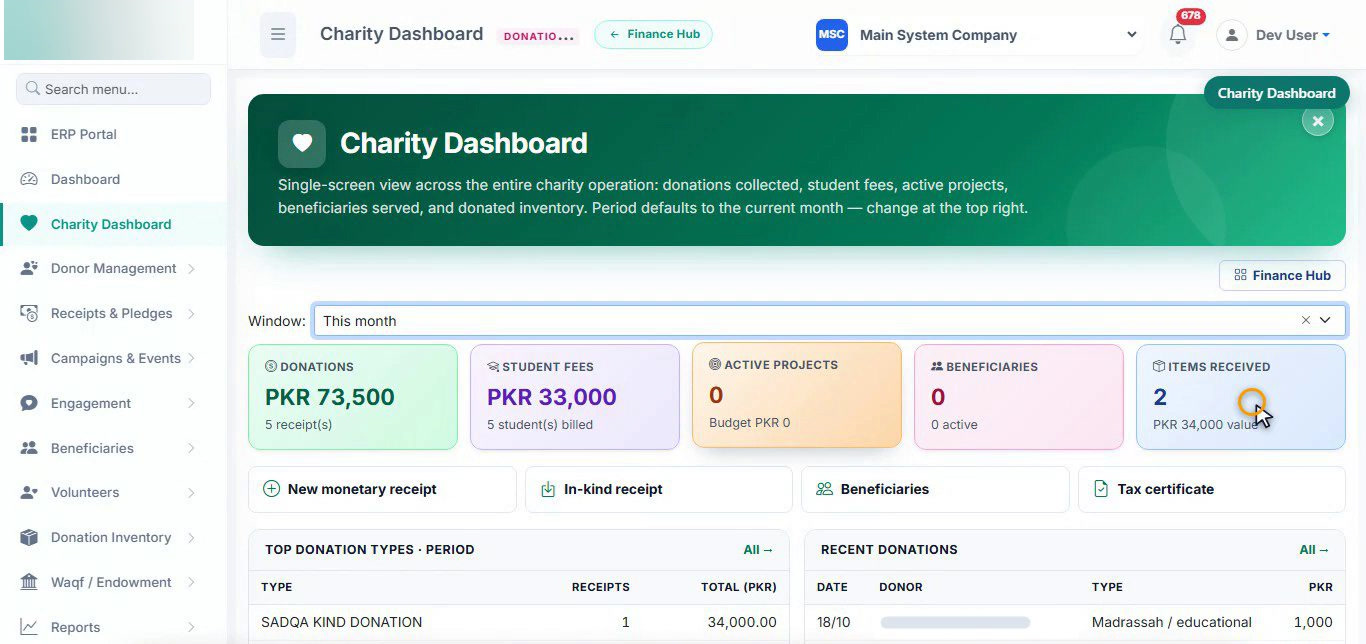
Charity Dashboard.
One screen across the charity: donations by fund such as Zakat, Sadqah and the building fund, student fees, projects, beneficiaries and donated goods. The donor's name under "Recent donations" is redacted.
- One receipt, several funds: such as Zakat, Sadqah, Fitrana and a building fund, with one voucher and a printed receipt for the donor.
- Cheques tracked to cleared or bounced; a bounce reverses the voucher automatically.
- In-kind donations raise a goods received note straight into the warehouse.
- Monthly pledges with an instalment schedule and a month-end pledge run.
- Donor 360, donor tiers, campaigns, message templates, beneficiaries, volunteers, waqf assets and donor tax certificates.
Fees billed by class,
never twice.
For schools and madrassahs with monthly, quarterly and annual programs, scholarships and sponsored students.
- Fee policies with versions: draft, submit, approve, activate, so next year's fee starts on its own date.
- Batch billing by period, class or teacher; a month already billed is skipped student by student.
- Receipts for one or several months with a minimum per month; a smaller amount goes to an approver with its reason.
- Scholarships through approval, sponsors who pay towards a student's fees, follow-ups and reminders.
- Class transfers with history, leavers kept (never deleted), annual rollover with a preview, Student 360 and outstanding as at any date.
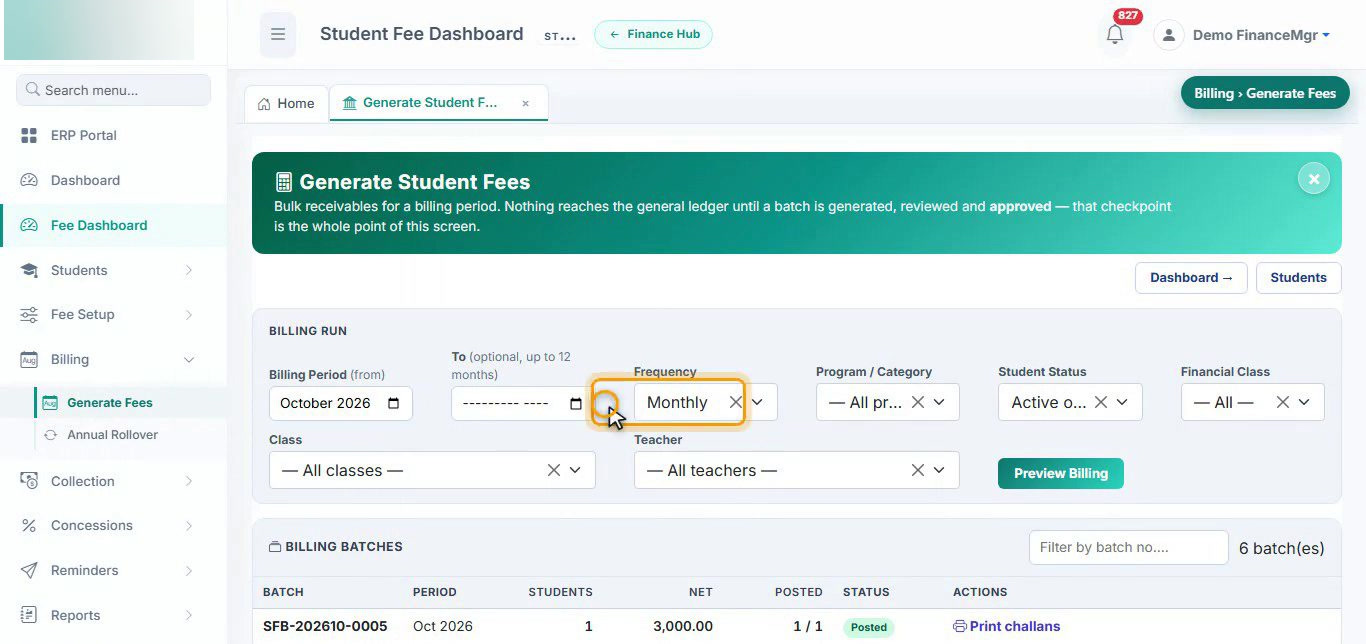
Generate student fees.
Fees are billed in batches for a period and can be filtered by class, teacher, program or financial class. Nothing reaches the general ledger until a batch is previewed, approved and posted, and a month already billed is skipped.
Your policy,
not the software's.
Attendance, leave and payroll rules are settings the HR manager changes, with no software change and no downtime.
- Employees with salary structures by effective date: a change is a new structure, never a typed-over one.
- Daily attendance from a file or by hand, filling the monthly sheet by itself, with months that can be locked.
- Late arrivals, leaving early and absences handled by your rules, taken from annual leave first if you choose.
- Leave applications and balances, and salary advances recovered from pay.
- Payroll with a salary register, payslips in a batch and payroll journals posted to finance.
- Increments, grades, promotions, documents with expiry dates and a renewals list.
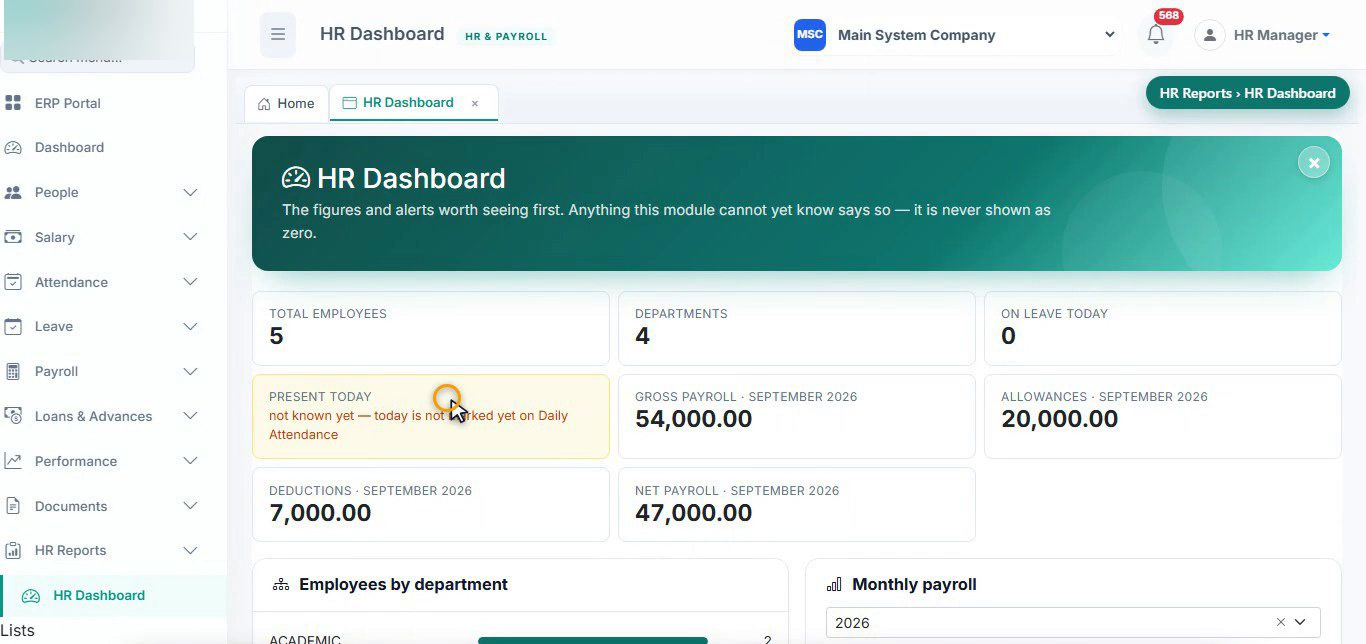
HR Dashboard.
The figures worth seeing first: headcount, departments, leave and attendance today, and the last payroll's gross, allowances, deductions and net. Anything the module cannot know yet says so instead of showing zero.

HR Settings.
Payroll, late-arrival, absence, leave and weekly-off rules are settings, not code. Each rule is explained in plain words, and every screen that uses a rule shows which setting is in force.
Memberships that
bill themselves.
A gym run inside the same ERP, with its own income and receivable accounts.

Fitness club dashboard.
Members, billing, collections and what is still owed, with a "worth a look" alert, members per shift and visits read from the access machine's attendance file.
- Packages and shifts, including women-only shifts, with automatic member numbers and a printed application form.
- Monthly billing run with a preview: part months by days, discounts and a one-time admission fee.
- Receipts and fee slips, part payments, and adjustments carried forward when a facility was closed.
- Attendance read from the access machine's file, with day and month reports.
- Outstanding fees after a grace period, reminders and income reports.
From the quote
to the final payment.
Banquets and outdoor catering, with the accounting done as the booking moves along.
- Booking in steps: client, event, menu, venue and extras, with a discount and an advance.
- Vouchers post themselves for the booking and the advance, and marking the event completed books the income.
- Balance payments, a printable statement with terms and signatures, and an event calendar.
- Booking journal, outstanding ledger, ageing, top clients and top items.
- Voiding a booking reverses every voucher: nothing is deleted.

Catering bookings.
Quotes, confirmed events, billing and balances in one list. Each booking carries its menu, venue, extras, advance and balance, posts its own vouchers and prints a statement for the client. Client names and phone numbers are redacted.
Every setting,
in one place.
Who can see what, how each company is set up, and whether the system is healthy, without opening a database tool.
- Users and roles with page-level View, Create, Edit, Delete and Print rights, and access to one or several companies.
- Configuration Dashboard showing green, amber or red for each set-up area, with a pencil to fix it.
- Policy Console, business rules, approval limits and notification settings for SMS, email and WhatsApp.
- Admin Copilot and Software Copilot for plain-language questions and how-to answers.
- Audit log browser, posting health, system diagnostics and a backup console.
- Password reset queue, forgotten-password requests and accounts closed (never deleted) when someone leaves.

Admin Control Center.
Every setting, where it is and what it changes: status tiles for users, companies, approvals and audit events, a search across admin tools, favourites, and sections for access, company structure, settings, operations, audit and utilities.

Admin Copilot.
Ask for "pending approvals" or "overdue receivables" in plain words and the Admin Copilot answers from the company's own data, with read-only queries scoped to that company. A Software Copilot answers how-to questions with a link to the right page.
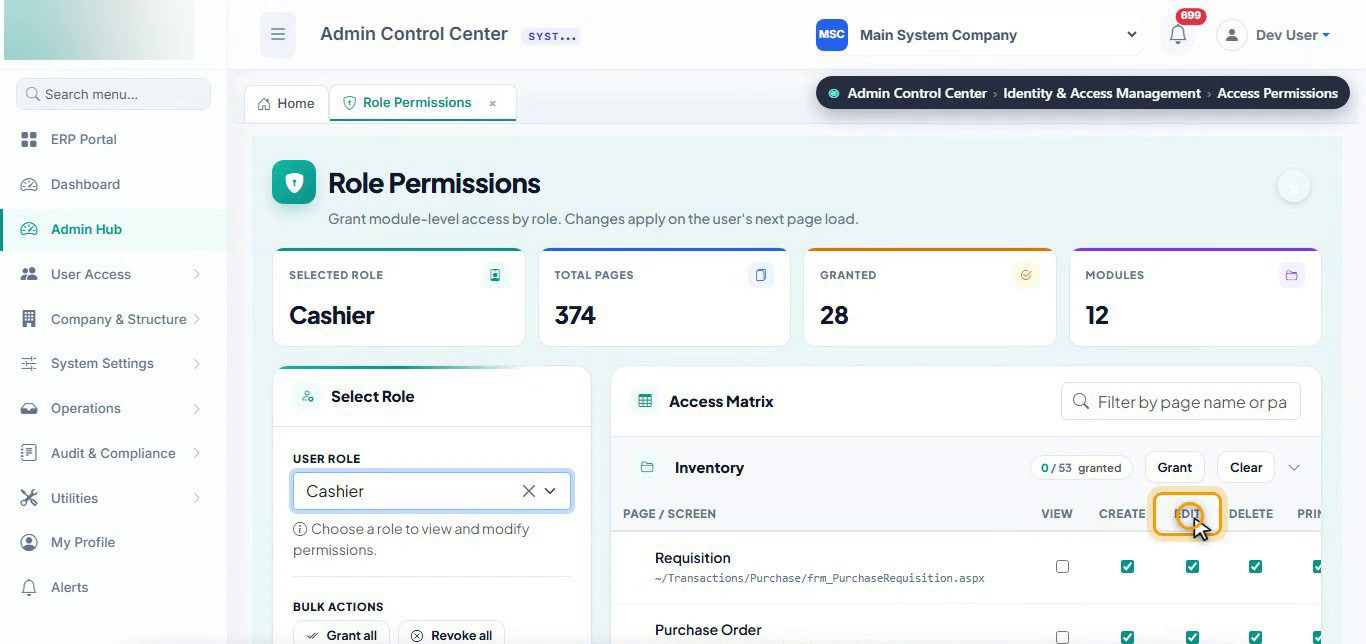
Role permissions.
Rights are given per role and per page, with separate View, Create, Edit, Delete and Print ticks, bulk Grant and Clear per module, and changes that apply on the user's next page load.
Screens are frames from the product's own training recordings, made on the test company and on a practice copy of the system. Personal names, donor names and client contact details are redacted.
Built to be trusted
at the counter.
How we keep a system that handles cash, stock and salaries every day correct and fast.
Technology
An N-tier web application: WebForms pages over a business layer and a data-access layer, on one SQL Server catalogue shared safely by every company.
Nothing is ever deleted
- Mistakes are voided with a reason, which reverses the linked stock and journal entries.
- Documents stay editable in place only until a later document depends on them.
- An audit strip on every transactional form shows who created and last changed it.
Made for busy counters
POS line actions are designed to respond in under half a second. Key pages are pre-warmed on the server, counter sessions last a whole shift, and a small print-bridge service sends ESC/POS slips to network thermal printers, so terminals need no printer drivers.
Tested and taught
- About 1,100 automated end-to-end tests in 154 Playwright spec files: the regression suite behind every change.
- 20 Urdu-narrated video guides, one or more per workspace, each following real demo records from start to finish.
- Product requirements, architecture and business-rule documents kept with the code.
Your questions,
answered.
What is the Enterprise ERP & POS?
What is new in the ERP in 2026?
Does the restaurant POS work with a kitchen display and thermal printers?
How does the POS calculate food cost?
Can one installation of the ERP run several companies?
How are mistakes corrected if nothing is deleted?
Does the ERP support Urdu and Hijri dates?
What technology is the ERP built with?
Running a restaurant, a store, a school
or all of them at once?
We build and tailor ERP and POS systems that fit the way your organisation already works. Tell us what you run, and we will show you the ERP on your own processes.