A POS that sells by plate, KG and deg, and keeps working offline.
In short Take table and parcel orders on picture-based screens, sell by plate, KG or amount, book degs and catering with advance and balance, and see real profit from your recipes. It runs on a PC in your shop, so the internet going down never stops a sale.
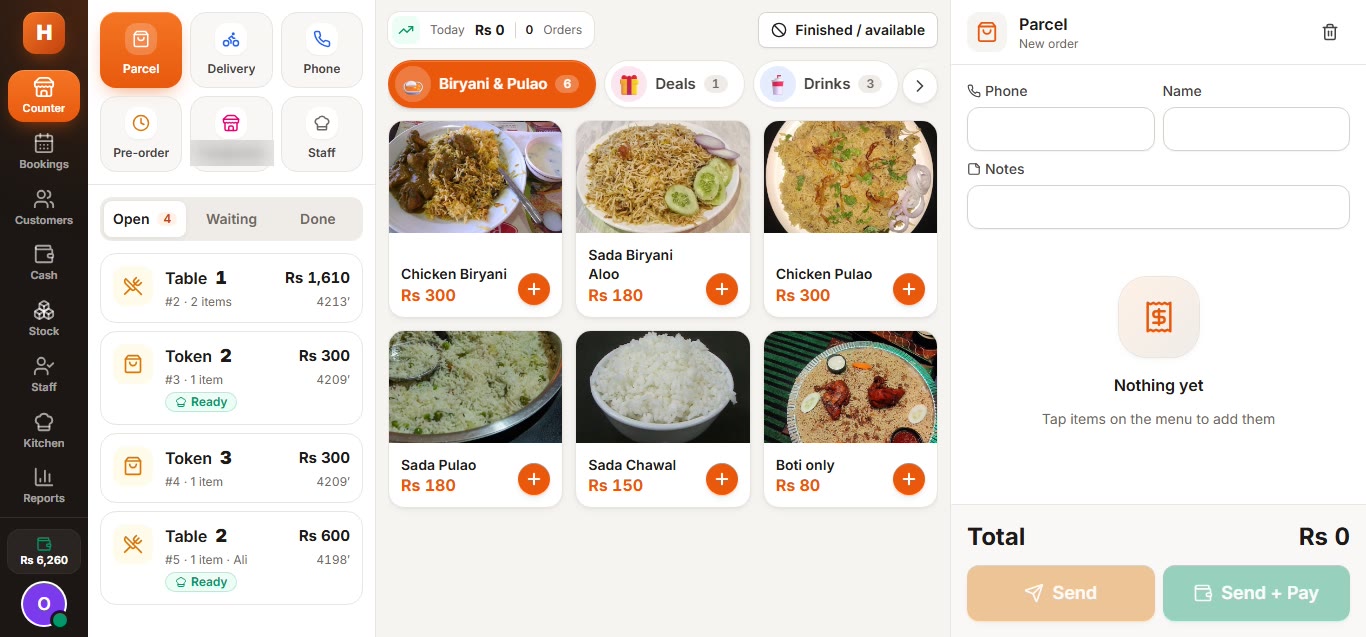
Counter POS.
Every open table, token and parcel on the left, a photo menu in the middle and the order on the right. Sell by plate, by KG or by amount, split the payment or put it on khata. A delivery-app label is blurred.
The rush-hour mistakes,
gone.
The everyday problems of a busy biryani counter, and the part of the POS that handles each one.
KG sales worked out by hand
Sell by weight or by amount: a customer asks for Rs 500 and the KG is calculated. Plate, half, KG, deg and piece prices live on the same item.
Orders lost between waiter and counter
Waiters tap pictures for the table, size, extras and notes, and the order reaches the counter and kitchen at once. A cart is kept even if a phone drops off Wi-Fi for a moment.
Deg bookings in a register
Each booking keeps the date, venue, guests, items, advance and balance, and the calendar warns when the kitchen is already full for that time slot.
Pots that never come back
Bartan are tracked by number with a deposit, a due date, the return and any damage charge.
Khata on loose paper
Credit sales go into each customer's khata by phone number, with a credit limit, payments received and the balance.
Cash that does not match
Shifts open with a float and close with a note-by-note count. The shortage or excess shows while you count, and the day summary goes to the owner's WhatsApp in one tap.
From the waiter's phone
to the owner's report.
Real screens from the current build, on its sample menu and demo data. Click any screen to zoom in.
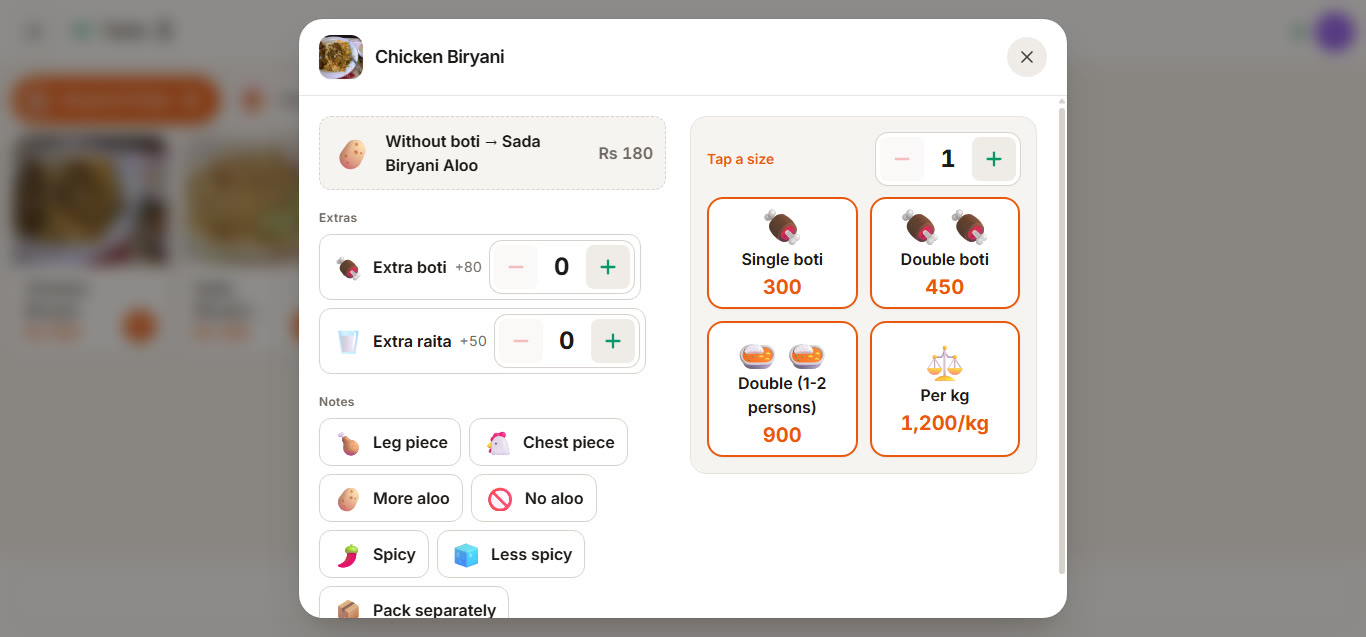
Size and extras picker.
Size, extras and notes are pictures, so a waiter never types. "Without boti" switches the line to the plain item at its own price.

Table map.
Each table is a big coloured tile: free, in the kitchen or waiting for the bill, with the running amount.
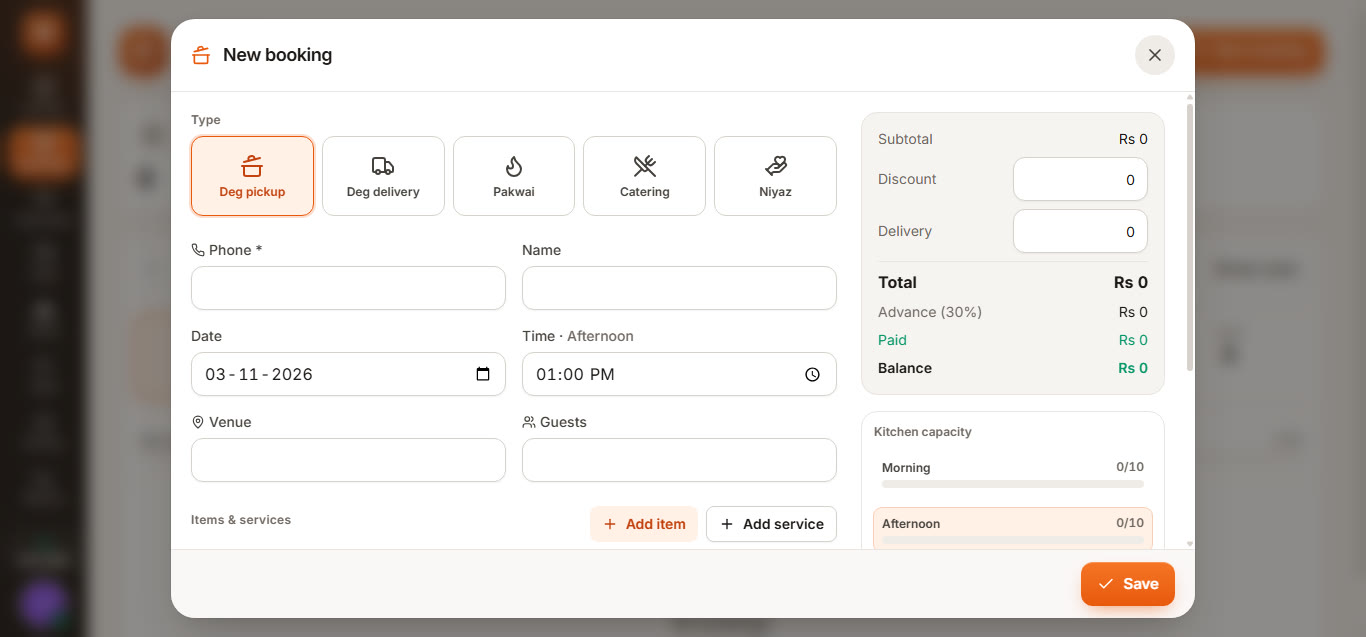
Deg and catering booking.
Degs and catering with advance, balance and kitchen capacity per time slot, so the kitchen is not overbooked.

Owner reports.
Sales, expenses, khata, bookings and gross profit from recipe cost for any dates, with one-click Excel for the accountant. Shown on demo data.

Stock and recipes.
Raw material by KG and litre with average cost and value. Recipes deduct stock when a bill is paid.
Everything behind
the counter.
The rest of what a food business needs, in the same system.
Kitchen screen & tickets
Big kitchen tiles with item pictures and table or token numbers. Marking an order ready alerts the waiter's phone, and a token screen tells parcel customers when to collect.
Recipes, stock & profit
Recipes deduct rice, meat, ghee and packing when a bill is paid, with purchases, supplier khata, wastage, stock counts and profit per item.
Staff & riders
Attendance, salaries, advances and daily wages, plus rider deliveries and the cash each rider collected.
Control & backups
Staff sign in with a picture and PIN, new phones must be approved, voids and big discounts need a manager PIN, every money change is logged, and backups run nightly and at day close.
Three steps
to going live.
Free 30-minute demo
See the POS on its sample menu: a table order, a KG sale, a deg booking and the day-close report.
Set up on your menu
We send a written scope and quote. Once agreed, we load your menu, prices, deg sizes and staff, and install it on a PC in your shop.
Train and go live
We train your counter, waiters and kitchen, and 30 days of support are included after launch.
Biryani & catering POS,
answered.
Who is this POS for?
Does it work without internet?
Can it sell by KG and by amount?
Can waiters who cannot read use it?
How are deg and catering bookings handled?
Do I need a thermal printer?
Does it track stock and profit?
How much does it cost?
Run the counter, kitchen and bookings
from one place.
Book a free 30-minute demo on the sample menu. We send a written scope and quote before any work starts.