Gym software that locks the door when the fee is due.
In short Members, packages and fees on the reception PC, connected to the face and fingerprint machine at your door. When a fee is due the member's finger and face stop working; when it is paid they work again, without anyone typing the admin password on the machine. Attendance, receipts, WhatsApp reminders and the month's collection come with it, and it keeps working without internet.

Today at the gym.
Who came in today, by finger or face; who is due, with the door blocked until they pay; and who expires soon. The month's collection and pending fees stay on the right. Shown on demo data.
No more chasing fees
at the door.
The everyday problems of a gym front desk, and the part of the software that handles each one.
Fee due, door still open
When a fee is due the software disables that member on the machine, and enables them again as soon as the fee is collected. You choose the grace days.
The admin password, again and again
Members are added, enrolled, enabled and disabled from the reception PC over the network. Nobody walks to the machine.
“Who came today?”
Check-ins come from the machine into a live list, by finger or face, with a red alert when a fee-due member tries to come in.
Adding up the month by hand
The dashboard shows this month's collection, from how many members, and how much is still pending.
Members forget their fee date
A daily reminder list for before, on and after the due date. Press Send and WhatsApp opens with the message written.
Arguments over who paid what
Numbered receipts on screen, as a print or PDF, or on WhatsApp, part payments with a balance, and an audit log of every discount, refund and date change.
Members, money
and the door.
Real screens from the current build, shown on a demo gym with sample members. Click any screen to zoom in.
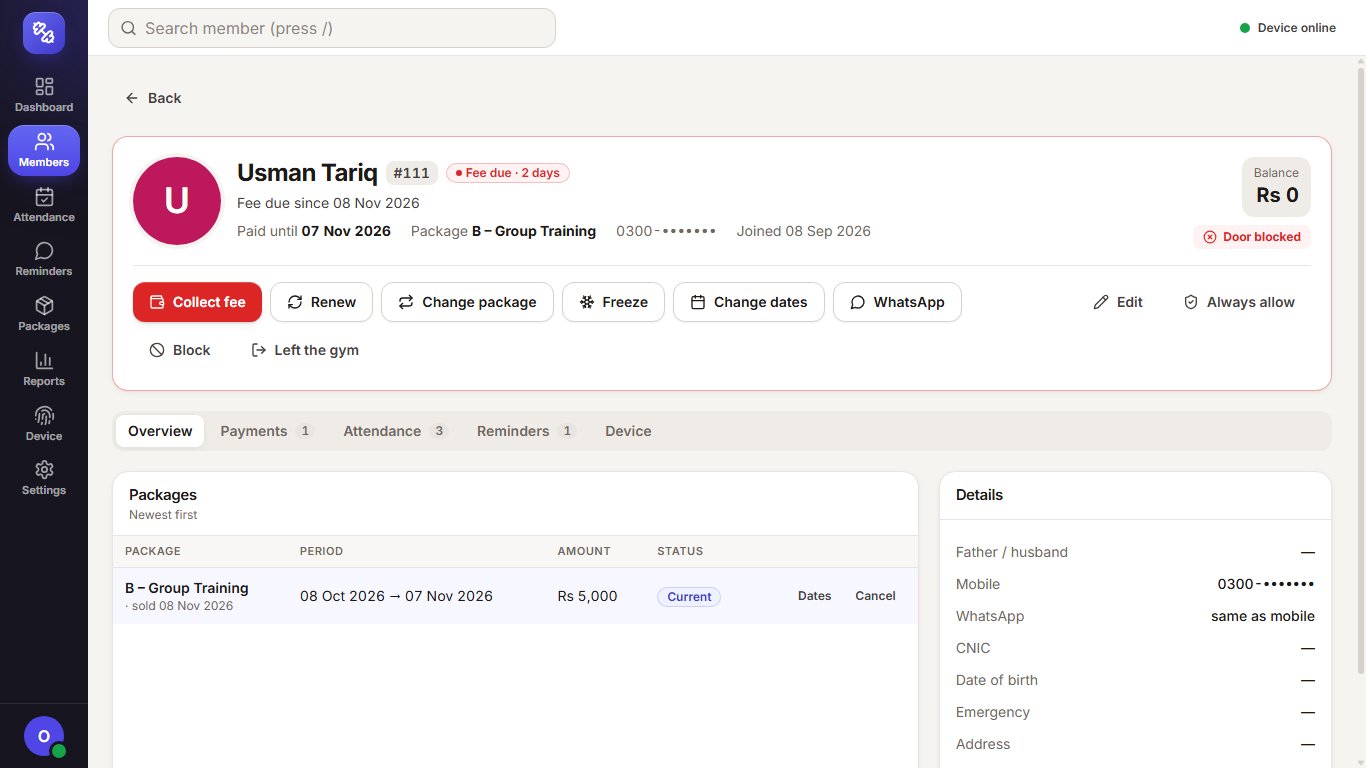
Member page.
Status, paid-until date, package and balance, with every action one click away: collect, renew, change package, freeze, change dates or message on WhatsApp. Phone numbers are masked.

Door control log.
The machine follows the fee rule on its own. Every command is logged: enabled after a payment, disabled on a block or freeze, and fingers and faces enrolled from the PC with a backup.
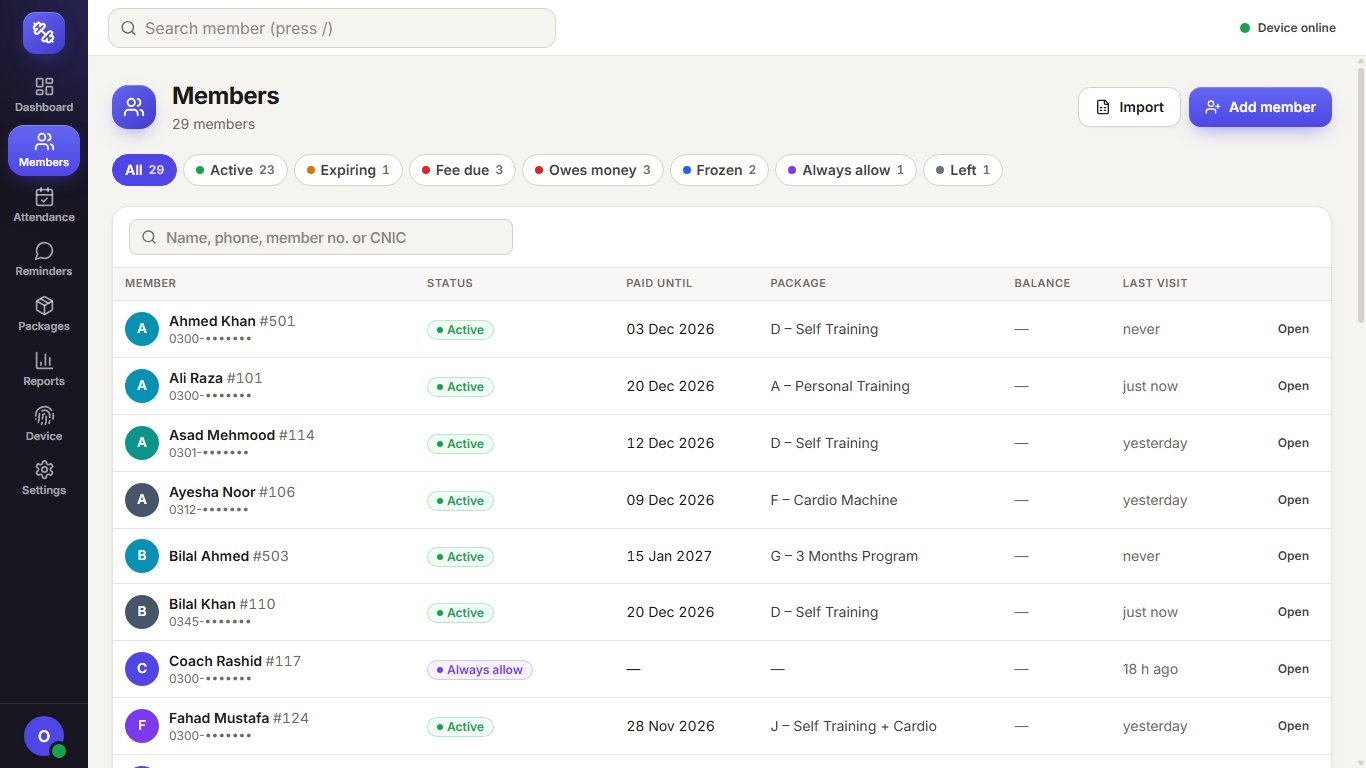
Members.
Filter by active, expiring, fee due, owes money, frozen or left, and search by name, phone, member number or CNIC. Phone numbers are masked.
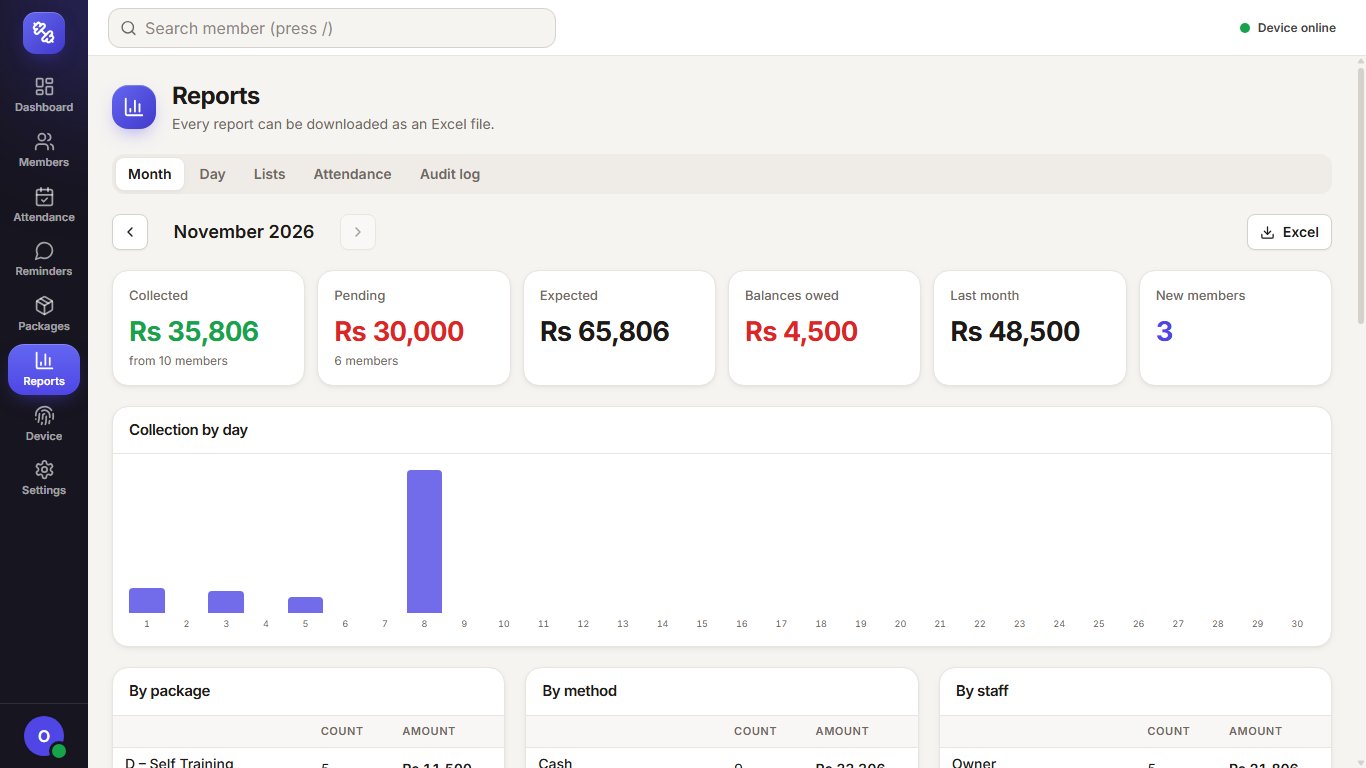
Monthly collection.
Collected, pending and expected for the month, collection by day, package, payment method and staff, and every report downloads as Excel.

WhatsApp reminders.
Messages before, on and after the due date, plus receipt and welcome messages. Reception presses Send and WhatsApp opens with the message filled in.
Accounts, payroll
and the café.
Other DeviSofts systems a club can run alongside it, each with its own free demo.
Gym ERP workspace
For bigger clubs: shifts, including women-only shifts, a monthly billing run with a preview, and accounts in our multi-company ERP.
HR & payroll
Attendance, leave, advances, payslips and payroll for trainers and staff.
Café or juice bar POS
Our restaurant POS with a kitchen display and recipe costing for a café inside the club.
WhatsApp bulk sender
A Windows app for one message to every member, such as new timings or a closed day.
Three steps
to going live.
Free 30-minute call
Tell us about your packages, how many members you have and which machine is at your door. We show you the software on demo data and answer your questions.
Set up on your reception PC
We install it with one setup file, take a full backup of the machine first, add your packages and import your members from your old software's Excel or CSV file. People already saved on the machine are linked to their member record, so nobody enrolls again.
Preview, then switch on
A preview shows which members the machine would enable or block before anything changes. Then we train reception and the owner, and 30 days of support are included after launch.
Gym door control,
answered.
How does the door know a fee is due?
Does anyone still need the admin password on the machine?
Do our current members have to enroll again?
Is the data on the machine safe?
Which machine does it work with?
How are members reminded about their fee?
Can it handle part payments, discounts and freezes?
Does it need internet?
How much does it cost?
Fees paid on time,
without the arguments.
Book a free 30-minute demo on demo data. We send a written scope and quote before any work starts.